
The Composition API was introduced in Vue 3 and is the new recommended pattern for developing applications in Vuejs 3. We can still use Options and Composition API’s together and enjoy the beauty of both patterns.
If you have been using Vuejs for quite a while now, high chance you are familiar with the Options API. The options API was the default standard pattern used to organise and code Vuejs 2 applications.
Composition API was introduced to fix some of the limitations brought by the options API. It also solves the drawbacks of mixins (the primary logic reuse mechanism for Options API).
Some notable benefits of Composition API include:
- Smaller Bundle size & improved performance.
- Easier reuse of components logic.
- Improved TypeScript support.
- Easier App maintainability.
Let us take a glimpse at what has changed from the Options API to the new Composition API.
Options API & Composition API structure
Illustration of the Options and Composition API logic structure.
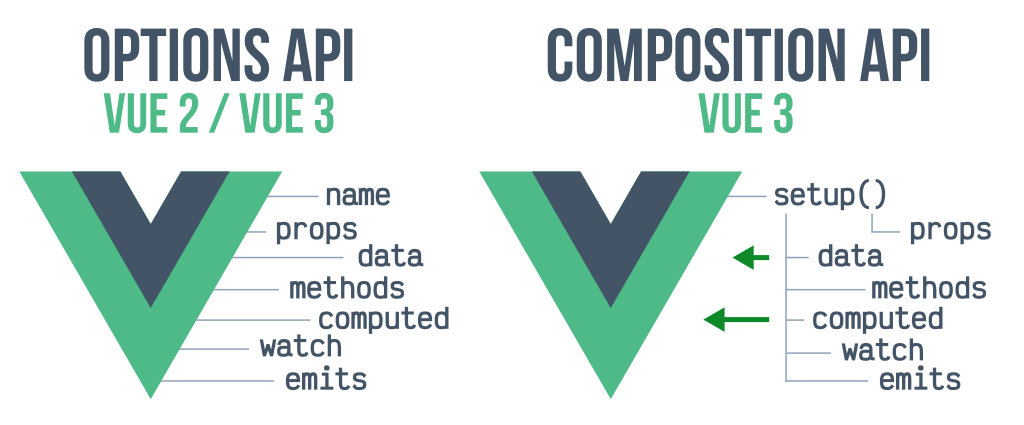
Image from lenguajejs.com
Part of what we will cover in this article include:
- Component Setup methods.
- Props (definition & passing props).
- Events (declaring & emitting events).
- Template refs (accessing child component properties).
- Reactivity (ref and reactive API’s).
- Lifecycle hooks(Options/Composition)
- Composition API Setup Method
- Composition API logic is written inside a setup function. This is where all our component’s logic lives.
Components Basics
Components make it easier to separate the application logic, UI concerns, while maintaining reusability across your application. In Vue 2, we have to import and register the component before we use them as shown below.
<script>
import { defineAsyncComponent} from "vue";
//import footer component
const Footer = defineAsyncComponent(() =>
  import(/*webpackChunkName: "Footer"*/ "@/components/Footer")
);
export default {
  name: "App",
  components: {
  //Register the component here
  Footer,
  },
};
</script>
Vue 3 introduced global and automatic component imports. We only need to import the component and Vue will auto register the component for us. Similarly, you can declare components as global to reuse them all over your application without default import.
Global component registration
We can register global components by importing and injecting them into the application entry file of main.jsas shown below.
import GlobalComponent from '@/components/GlobalComponent'
const app = createApp({})
app.component('global-component-name', GlobalComponent)
Now we can use global-component-name anywhere on the app. Vuejs 3 fixes the limitations Options API introduced while making our components structure simple, clean and easier to understand.
Reactivity in Composition API State reactivity is very important in any application that consumes and processes data. In Composition API, we have two main API functions (refs and reactive) used to handle state reactivity. While they have differences, it is widely recommended to always use refs due to some limitations of reactive.
Reactive
Reactive API function can be used to create reactive states of objects, arrays and collection types such as Set and Maps. To declare a reactive state, pass the object or array as argument to the reactive function.We can also render the reactive state variable to the DOM using the template syntax.
To access reactive state, you need a reference to the state as shown down below.
<script setup lang="ts">
import { reactive } from 'vue'
//declaring reactive state
const state = reactive({ version: `Vuejs 2`})
//accessing reactive state
state.version
//updating reactive state
state.version=`Vuejs 3`
</script>
<template>
//rendering state to DOM
 <p>{{state.version}}</p>
</template>
While reactive API is powerful, it presents some limitations:
- Loss of reactive state connection when we update the reactive state by calling the reactive API function. We must always keep the same reference to the reactive object.
- Reactive API does not work with primitive types such as string, boolean, and integer. Reactive can only be used to declare array, object and collection types.
Ref
Vuejs 3 ref API function can also be used to declare reactive states. State arguments passed in ref function are wrapped within an object and its value can be accessed using the .valueproperty.
<script setup lang="ts">
import { ref} from 'vue'
//declaring ref state
const state = refs(false)
//accessing ref state
state.value
//updating ref state
state.value= true;
</script>
<template>
//rendering state to DOM
 <p>{{state}}</p>
</template>
Lifecycle Hooks
Vuejs 3 introduced the script setup function. This has eliminated the need for the created lifecycle hook. Some component lifecycle hooks have been introduced to replace the hooks from Options API. See them below.
Both beforeCreate and created are replaced with the setup function itself and we don’t need to declare them as we do with the Options API. You will need to import the lifecycle hooks from vue to use them in our application.
Options to Composition API lifecycle hooks
Change in naming lifecycle hooks from Options to Composition API.
- beforeMount ---> onBeforeMount
- beforeDestroy ---> onBeforeUnmount
- beforeUpdate ---> onBeforeUpdate
- mounted ---> onMounted
- updated ---> onUpdated
- destroyed ---> onUnmounted
Props and props definition
Props allow us to pass data from parent to child components. While we can pass as much prop data as we require, we need to be cautious to prevent our component from being bloated with too many props (prop drilling).
Declaring props in Composition API is a bit different. We need to register the props in our child components using the defineProps macro.
To pass props from the Parent to Child component pass them as shown below.
<script setup lang="ts">
import { ref } from 'vue';
import { forums } from '@/config/forums';
import ForumList from '@/components/ForumList.vue';
</script>
<template>
 <article>
  <ForumList v-for="forum in forums" :key="forum.id" :text="forum.content" :bg-image="forum.bg-image" />
 </article>
</template>
On the child component, you can register the props using defineProps as shown below.
defineProps({
 text: {
  type: String,
  required: true,
 },
 bgImage: {
  type: String,
  required: true,
 },
});
Or even much better yet we can use the withDefaultsmacro that allows us to declare props in a Type-based declaration with default props values
withDefaults(
defineProps<{
 text: string,
 bgImage: string,
 }>(),
 {
//Declare default values here
text: `Vuejs is awesome`,
}
)
Emitting events
Emitting events is very essential when developing applications with Vuejs. It allows us to pass actions, methods, and properties up to the Parent component from the child components. To emit events in Composition API, we use the $emit macro.
Declaring emits
To declare emitted events, we use the defineEmits macro inside the child component script setup function. defineEmits macro takes in an argument containing the string array of events to be emitted. We can emit and register emitted events in child components as shown below.
<script setup lang="ts">
defineEmits(['close']);
</script>
<template>
<div>
     <button @click="$emit(`close`)">Cancel</button>
 </div>
</template>
In the parent component, we can listen to the close emitted event and pass a method to handle it. You can use the v-on: directive or use the short-hand @name-of-emitted-event .
<script setup lang="ts">
import { ref } from 'vue';
import Cancel from '@/components/Cancel.vue';

const cancelPopup = ref(false);
</script>
<template>
  <div>
   <Cancel @close="cancelPopup = true" />
  </div>
</template>
Template Refs
Templates Refs in Options API made it possible to access methods inside the child components. Vuejs components using either Options API or Composition API without
Composition API introduced a new way to expose components property using the defineExpose macro. Component properties passed to defineExpose macro will be open and accessible to parent component through Template refs.
In our case here, we want to expose theupdateBlogmethod from child component. Remember you can expose as many properties as you wish separating them with a comma as seen below.
defineExpose({ updateBlog, updateDate});
Accessing exposed component properties
To access exposed properties, the parent component will use the Template ref from the child component.
<script setup lang="ts">
import EditBlog from '@/components/EditBlog.vue'
import { ref } from 'vue';

const settings = ref();
function update() {
  settings.value.updateBlog();

}
</script>
<Template>
<div>
<EditBlog
     ref="settings"
     class="mb-4"
/>
</div>
</Template>
Check out defineExpose from the Official Vuejs Documentation for more related information
Final Thoughts
Having laid hands on Composition API in Vuejs 3 , these were my noticeable changes from the default Options API pattern to the Composition API. Vue has changed a lot and it is for the better with general improvement in application performance.
It is also important to note that the Composition API is an alternative of the Options API and both can be used together. Options API support in Vuejs 3 will still continue to be supported and wont be dropped as it is still being maintained.
How’s your experience working with Composition API and what are the changes you have noticed so far?
Occasionally, I send out an exclusive email with tips, articles, apps, books, and ideas I have found useful and related to technical writing 👇.