
Why State Management
State management involves implementing a design pattern in our application. It ensures our state data is organised into one central unit that we can reuse, and mutate synchronously without affecting other active data states.
Consider a scenario where have an application that manipulates and renders some data to the Frontend on various components/sections. If we leave every component to manage and manipulate the data on it own, we might end up having unnecessary data conflicts at times with unnecessary requests. This is where state management comes in, it allows us to structure out state data in one central place and manipulate it from there. It makes it easier for our application to manipulate the state data in one trusted source.
This also means, every time our state data changes, the rendered state data stated will also change and vice versa. Basically what state management does it organise all related state data, actions, and mutations into one central trusted source. This makes it easier to manage such state data.
State data is basically any application’s data (can be shared or unshared) and can be user information, products catalogues e.t.c. This data can be consumed and rendered in various sections of our application.
Benefits of state management
- Single source of truth in your application.
- Reduced/minimised requests from the application(compared to where every component performs its own request independently).
- Easier and efficient access of data with one single source of truth.
General theory of a state management
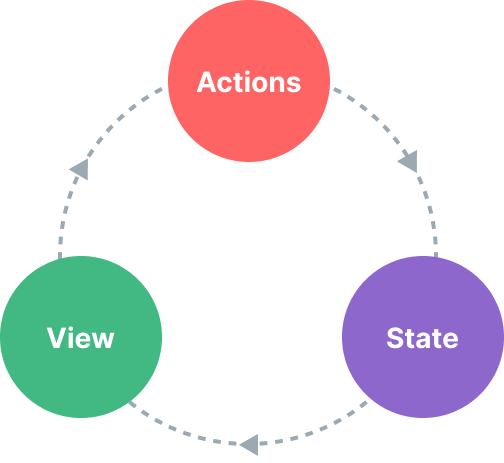
When to implement state management
Depending on the size and data that your application consumes, it is widely recommended to implement when your application size is fairly medium to large. When just prototyping things it is not necessarily useful and when your application size is fairly small.
What are state, getters, actions
- State — This generally refers to the data that is shared across the application components. This shared data is housed inside the state.
- Getters — Getters are functions that we can call to get state data. As the name suggests, they get state data and return it to us when called. Getters may manipulate the data in their own way but without mutating/interfering with the state data directly i.e searching e.t.c.
- Actions — Actions are mutations that we can use to change the state data in various ways. Actions functions may include state data manipulation such as updates, deletions e.t.c.
Setting up stores
Pinia is a state management library used and recommended for state management in Vuejs applications. It replaced VueX as the standard state management library in Vuejs.
We are going to implement stores with Pinia and see how it works. We will implement an application that fetch jokes from an api and stores the returned response to the store state. From there we can get the data and render them using getters, delete jokes from the state data using actions to see how Pinia does all this.
Installing Pinia
We can install Pinia using either yarn or npm depending on your preferred package manager.
//using yarn

yarn add pinia

//using npm

npm install pinia
Setting up the Stores
Our application store will look like so.
import { defineStore } from "pinia";
//define and export "useJokesStore"
export const useJokesStore = defineStore("jokes", {
  state: () => {
    return {
//our state date "jokes" here
      jokes: [],
    };
  },
  getters: {
//our getters goes here
 },
  actions: {
//here we will have our actions
});
On the example code above, we are defining and exporting useJokesStore store. Then we have the jokes state where we will store out jokes.
Inside our component instance, we can call useJokesStore and access all the properties inside it including the getters and actions and store state data.
Updating state data with Actions
In this instance, we are going to fetch some programming jokes from an API and store them in the jokes store state. To do this, we are going to use actions function.
actions: {
    async fetchJokes() {
      try {
        const res = await fetch(`https://joke.deno.dev/type/programming`);
        const data = await res.json();
  //assign returned jokes response to the jokes state data
     this.jokes = data;
      } catch (error) {
//incase of an error we just log it to the console
console.log(error);
      }
    },
  },
Our action is fetchJokes and is responsible for fetching the data and updating the store. Remember we will need to call the action fetchJokes to fetch and update the data(We will look at how we can call actions inside our components).
Invoking store actions
To invoke a store action, we call them like function or methods as shown below.
<script setup lang="ts">
import { useJokesStore } from "./stores/programmingjokes";
const jokes = useJokesStore();
</script>
<template>
  <h1>Programming Jokes API</h1>
  <div class="btn">
//on pressing the button, we invoke the fetchJokes action
    <button @click="jokes.fetchJokes">fetchJokes</button>
  </div>
</template>
Accessing state data using a getter
Assume an instance where we only want one joke from the api, we can setup a getter to fetch a single jokes from the jokes state array. We can use an index or id depending on the jokes state data.
getters: {
    //get a single joke from state using joke index
    getJokeWithId: (state) => (jokeIndex: number) => {
      return state.jokes[jokeIndex];
    },
  },
Here we can pass an index and return a joke from that index provided.
Invoking store getters
Like action, we can access getters as shown below.
<script setup lang="ts">
import { onMounted, ref } from "vue";
import { useJokesStore } from "./stores/programmingjokes";
const jokes = useJokesStore();
const jokesId = ref<number>(0);
const joke = ref();
function getJoke() {
//access the getter and assign the retuned value to joke
  joke.value = jokes.getJokeWithId(jokesId.value);
}
onMounted(async () => {
//fetch jokes when component is mounted
  await jokes.fetchJokes();
});
</script>
<template>
  <h1>Programming Jokes API</h1>
//user input index
  <input v-model="jokesId" />
  <div class="btn">
    <button @click="getJoke">getJokeWithIndex</button>
  </div>
<p v-if="joke">
//Render the joke when its index is available
{{ joke.setup }} <span>{{ joke.punchline }}</span>
  </p>
</template>
We call the getter function as follows from the example above.
jokes.getJokeWithId(jokesId.value)
Resetting the state
Most of the times, we would need to reset the state to its default. In such scenarios we need to call the $reset on the store we want to reset.
In our case here, we can reset the state by calling.
<script setup lang="ts">
import { useJokesStore } from "./stores/programmingjokes";
const jokes = useJokesStore();
//reset the jokes state
jokes.$reset()
</script>
Final thoughts
State management is very essential when developing medium to fairly larger application that shares state data on various components. Kudos for taking your time and reading to this far.
Occasionally, I send out an exclusive email with tips, articles, apps, books, and ideas I have found useful and related to technical writing 👇.